
House Chores Cleaning Schedule
HOME TASKER - CLEANING SCHEDULE ORGANIZER LTDHouse & Home
4.5286.00 Reviews
- Version
- 4.0.5
- Installs
- 500.00K
- Age Rating
- Everyone
Screenshots
Our Review of House Chores Cleaning Schedule
 Analysis by Appyee
When housework keeps resurfacing just as I think I have caught up, the hardest part is often deciding what needs attention next. House Chores Cleaning Schedule is built around that practical problem: it lets me turn household jobs into a recurring plan rather than relying on memory or a vague promise to “clean later.” I find that approach especially reassuring for a first-time user, because a useful start does not require planning a perfect routine for the whole home.
What to expect from a chore tracker
This is a home-organization app focused on chores and cleaning schedules, not a general-purpose home-management suite. Its central idea is simple: list the jobs you need to do, decide how often they should come around, and use the schedule to keep track. If you like a clear checklist, that can be enough to make an untidy mental to-do list feel more manageable.
The app is free to install, is rated for Everyone, and is made by HOME TASKER - CLEANING SCHEDULE ORGANIZER LTD. It has a 4.6 average from around 9,800 ratings and has passed 500,000 installs. Those figures suggest that the basic chore-tracking idea has found an audience, though they can’t tell you whether its workflow will suit your household. The current version is 3.0.0, and it requires Android 9 or later. Optional in-app purchases range from $4.99 to $94.99 per item, so I’d check what is included before paying for anything; the free starting point is the sensible way to judge whether the routine itself works for you.
The main benefit I see is not that a list makes cleaning effortless. It gives recurring work a place to live, so I can stop spending attention on remembering whether I last cleaned a particular area. That distinction matters: the app can help organize and prompt, but the actual chores still need to fit the time, energy, and people available at home.
Getting Started with Ease
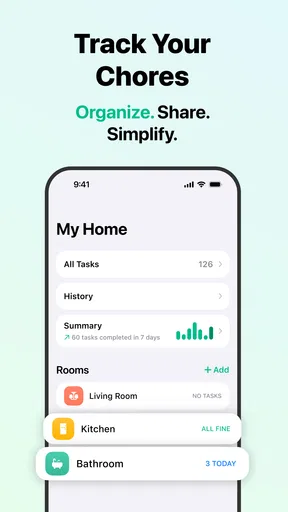
When you first open the House Chores Cleaning Schedule app, the setup is pretty straightforward. You don’t need to be a tech wizard to navigate through it. The interface is clean (pun intended) and user-friendly. You start by adding the rooms in your house and the chores that need to be done. Whether it's vacuuming the living room or scrubbing the bathroom tiles, you can list everything down.
For the first setup, I’d resist the temptation to enter every job in every room. Start with a small, useful slice of the home: perhaps the kitchen, bathroom, and the one floor or area that gets messy fastest. Add the tasks you genuinely repeat, not every occasional deep-clean idea. A shorter schedule is easier to trust and maintain; you can expand it once you see how the recurring reminders fit your week.
It also helps to write chores at the scale you can actually complete. “Clean the whole house” is hard to act on, while “wipe kitchen counters” or “vacuum the hallway” gives you a clear finish line. That is a practical way to make the list less intimidating, particularly if you tend to postpone jobs when they feel too broad. I’d treat room names as useful anchors, then keep each task specific enough that you know what checking it off means.
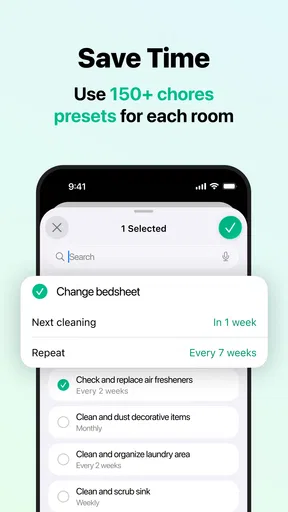
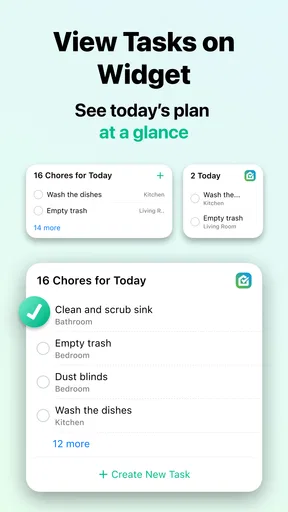
One feature I particularly liked is the ability to set how often you want each task to be repeated. For example, you can decide to mop the floors weekly while dusting might be a twice-a-week affair. The app then creates a personalized schedule for you. It's like having a personal assistant who keeps reminding you of what needs to be done next.
Getting to the first useful result
A realistic first win could be finishing one small task that has been easy to forget, then marking it complete. For example, after making dinner, I might wipe down the kitchen counters and check off that task. The value is modest but immediate: I have done something visible, and I have begun using the schedule rather than merely building a list. That is a better test of the app than spending a long time entering chores without acting on any of them.
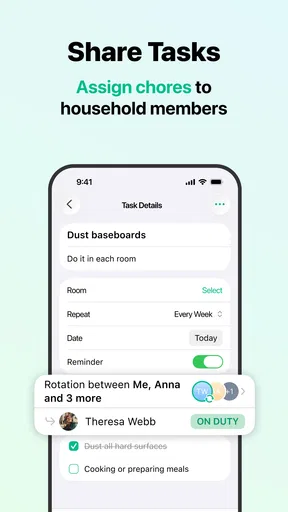
For a household with roommates, a useful trial is to agree on a few shared jobs before trying to divide everything. Put recurring tasks into the schedule, then decide together who will handle each one and when. The app’s ability to share a schedule can help everyone refer to the same plan, but it does not settle disagreements about what “clean enough” means. A brief conversation about expectations is still important, especially for jobs like bathrooms or shared kitchen surfaces.
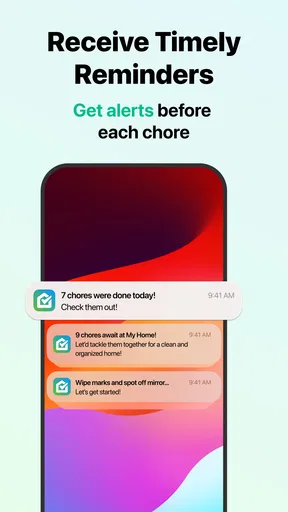
One non-obvious trade-off is that reminders work best when their timing is realistic. If every notification arrives while you are commuting, at work, or busy with family, it may become background noise. I’d set reminders around moments when a small task could plausibly fit, then adjust the routine if I repeatedly dismiss them. The aim is a helpful nudge, not a stream of alerts that makes the app feel like another chore.
Keeping Track Without Hassle
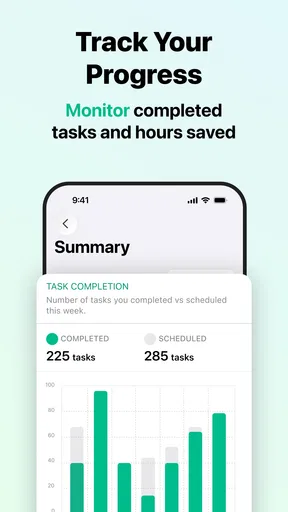
Now, let’s talk about the app's tracking features. Each time you complete a task, you can check it off your list. It might sound simple, but there’s a certain satisfaction in ticking off chores. Plus, the app keeps a record of your completed tasks, so you can see how productive you’ve been. It’s like a pat on the back every time you get something done.
That completion record can also help with a more practical question: is the schedule asking too much of you? If the same job regularly rolls around unfinished, I would treat that as a signal to reconsider its frequency or break it into smaller parts, rather than as proof that I need to try harder. A tracker is most useful when it helps me notice patterns and make a plan more realistic.
If you’re like me and sometimes forget what needs to be done, the app’s notification system is a lifesaver. You can set reminders for each task, ensuring nothing slips through the cracks. It’s like having your own little reminder buddy who nudges you when it’s time to clean the windows.
There is a balance to strike, though. A reminder can prompt action, but too many scheduled jobs can make a normal week look permanently behind. I’d avoid setting every task to repeat frequently just because it is possible. Begin with the chores that matter most to comfort or hygiene, and leave occasional jobs out of the recurring routine until you know you want them there.
Customization Galore
One of the things I appreciate most about this app is how customizable it is. Not everyone has the same cleaning needs, and the app developers seem to understand that perfectly. You can add as many tasks as you need and adjust their frequency as your schedule changes.
That flexibility is valuable when a household’s routine changes: a busy work period, guests staying over, or a shift in who is home during the day can all make an old schedule less practical. Rather than treating the original plan as fixed, I’d review it when circumstances change. Adjusting a repeat pattern is often more useful than keeping an unrealistic schedule and quietly ignoring it.
A good way to keep customization from becoming a project is to separate routine chores from occasional ones in your own thinking. The recurring list should cover jobs you want to remember at regular intervals. A one-off task, such as cleaning before visitors arrive, may not belong in that routine at all. This distinction keeps the everyday plan readable and helps prevent rare jobs from crowding out the tasks that make a noticeable difference each week.
Moreover, if you live with family or roommates, you can share the schedule with them. This means everyone is on the same page, and tasks can be divided evenly. No more arguments about who forgot to take out the trash!
In practice, sharing is most helpful when the schedule is treated as a common reference rather than a substitute for communication. If one person has more time on a particular day, or a task needs attention sooner than planned, the household still has to coordinate. I’d start by assigning a few clearly defined jobs and see whether everyone finds the arrangement fair before expanding it to the whole home.
Where it fits—and where it may not
Compared with a paper chore chart, the app offers a digital schedule, completion tracking, and reminders without needing to rewrite a sheet when a routine changes. Compared with a general notes or calendar app, it is more directly organized around repeating household tasks. Those alternatives may still be better if you want a completely flexible blank page, already manage everything in one calendar, or prefer a visible paper chart on the fridge that everyone can see without opening a phone.
I think this app is a good fit for someone who has a handful of recurring chores, forgets when they were last done, or wants family members or roommates to work from a shared plan. It may also suit a person living alone who wants gentle structure without turning cleaning into a large productivity system. On the other hand, if you only have a few irregular jobs, a basic notes list may be quicker. If you dislike reminders or do not want to maintain a digital schedule, the extra tracking may feel like overhead rather than help.
It is also worth remembering that a chore tracker organizes tasks; it does not judge which jobs matter most in your home. A small apartment, a shared house, and a home with children can call for very different routines. I would use the app to support decisions I have already made about priorities, rather than assume that a full list means every task deserves equal attention.
Visual Appeal and User Experience
Let’s not forget about the app’s design. It’s visually appealing without being overwhelming. The colors are easy on the eyes, and the layout is intuitive. You won’t find yourself lost or confused trying to find a specific feature. The developers have done a good job keeping things simple yet effective.
That straightforward feel is useful for a first-time user because the important work is deciding what belongs on the schedule, not learning a complicated system. Even so, simplicity does not remove the need for a little upkeep. When a task no longer makes sense, I’d edit the routine rather than leave it there indefinitely; otherwise, a once-helpful list can gradually become cluttered and less inviting to check.
Plus, the app is lightweight and doesn’t take up much space on your phone. This is a big plus for those of us who are constantly battling low storage space issues.
For someone deciding whether to install it, the practical question is whether a digital prompt will change what happens during an ordinary week. I would try the free version with a short list first and judge it by whether I complete and maintain those tasks, not by how many chores I can enter. Since optional purchases are available, I’d only consider one if I had already established that the basic routine is useful and understood what the purchase adds.
Making the routine last
After the first few successful check-offs, the next step is to keep only the parts of the schedule that earn their place. If a task is too frequent, adjust it; if it is too broad, split it; if it rarely matters, remove it from the regular plan. That small review helps the app stay connected to the real condition of your home instead of becoming a second list of things I feel guilty about not doing.
A practical weekly reset does not need to take long. I’d glance over upcoming chores, note any unusual commitments, and decide whether the plan needs a temporary adjustment. A holiday week or a run of late shifts is not a normal week, so it can be more sensible to scale back than to let missed reminders accumulate. This is where a flexible schedule is more useful than a rigid chart: the routine can follow the household, rather than the household having to obey the routine.
New users may wonder whether they need to complete every scheduled item as soon as it appears. I would not treat the schedule as a deadline system. It is a prompt for recurring care, and real priorities can change from day to day. If a spill needs attention now, handle it; if a low-priority dusting task can wait, let the plan reflect that. The record is there to help you understand what has been done, not to turn a missed box into a failure.
Another useful question is whether the app is only for people who enjoy cleaning. I don’t think so. Someone who dislikes chores may benefit from making the next action smaller and clearer, while someone who already has a reliable routine may appreciate the reminders and shared schedule. But if the main problem is that there is not enough time or help to do the work, a tracker cannot solve that on its own. In that situation, a simpler plan with fewer priorities—or a conversation about dividing the load—may matter more than adding tasks to a screen.
For a first week, I’d choose a few jobs that are easy to recognize as complete, set repeat intervals that match how the home is actually used, and try the reminders at reasonable times. Then I’d make one adjustment based on what got done and what did not. This low-pressure approach gives you a meaningful test without asking you to reorganize your entire household before you know whether the app feels natural.
Final Thoughts
In conclusion, the House Chores Cleaning Schedule app is a nifty tool for anyone looking to streamline their cleaning routine. It’s user-friendly, customizable, and keeps you on track without any hassle. Whether you’re a cleaning enthusiast or someone who dreads doing chores, this app can make the process a little more bearable. So, if you’re tired of feeling overwhelmed by housework, give this app a try. You might just find cleaning a tad bit more enjoyable!
Verdict
Strengths of House Chores Cleaning Schedule
- User-friendly interface for easy navigation.
- Customizable chore schedules and reminders.
- Syncs across multiple devices seamlessly.
- In-app tutorials for first-time users.
- Integrates with smart home devices.
Limitations of House Chores Cleaning Schedule
- Limited features in the free version.
- No offline mode available.
- Occasional sync issues reported.
- Some ads in the free version.
- Lacks advanced analytics tools.
Similar Picks in This Category
View All
Universal TV Remote Control
CodeMatics Media Solutions3.9

AlfredCamera Home Security app
Alfred Systems Inc.4.7

Planner 5D: AI Home Design
Planner 5D4.5

Universal Tv Remote-Cast to TV
One Music Player4.1

Zillow: Homes for Sale & Rent
Zillow Group4.8

99acres Buy/Rent/Sell Property
infoedge.com4.3
Frequently Asked Questions
What is House Chores Cleaning Schedule and how does it work?
House Chores Cleaning Schedule is an app designed to help users organize, assign, and track household chores. It allows you to create a schedule, set reminders, and even assign tasks to different family members. The app’s intuitive interface makes it easy to monitor progress and ensure that no task is left undone.
Is House Chores Cleaning Schedule available for both Android and iOS?
Yes, House Chores Cleaning Schedule is available for download on both Android and iOS platforms. You can find it in the Google Play Store for Android devices and the Apple App Store for iOS devices. Ensure your device meets the minimum system requirements for optimal performance.
Can House Chores Cleaning Schedule be used by multiple users?
Absolutely, House Chores Cleaning Schedule supports multiple users, making it ideal for families or roommates. Each user can have their own profile, and tasks can be assigned to specific individuals. This feature helps in distributing the workload evenly and ensures everyone is aware of their responsibilities.
Does the app offer any customization options for tasks and reminders?
Yes, the app offers extensive customization options. Users can tailor tasks according to their needs, set specific reminders, and even prioritize chores based on importance. This flexibility ensures that the app can accommodate various household dynamics and preferences, making it a versatile tool for managing chores.
Is there a cost associated with using House Chores Cleaning Schedule?
House Chores Cleaning Schedule offers a free version with basic features. However, for those seeking advanced functionalities, such as enhanced customization options and ad-free experience, there might be a premium version available for purchase. Check the app store for current pricing and feature details.
